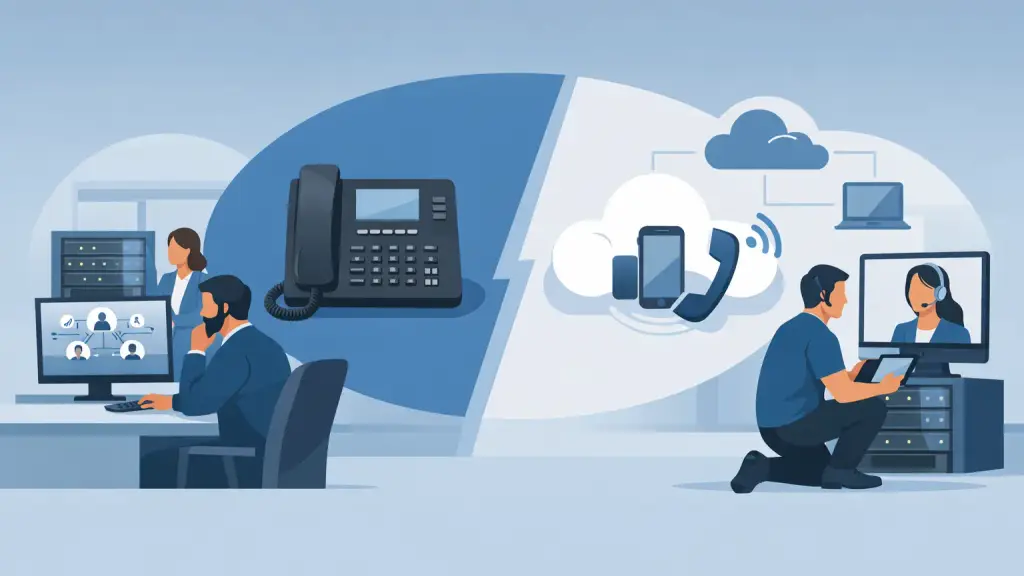
A working phone system is not a technology debate when customers, vendors, and employees rely on it all day. The real question behind Avaya IP Office versus VoIP is whether your current system can continue serving the business reliably or whether a change will reduce operational risk. For many Chicago-area organizations, the right answer is not an immediate replacement. It is a clear assessment of the existing system, its condition, and what the business needs next.
The comparison can also be misleading. Avaya IP Office is a business phone system platform that can support traditional digital and analog connections as well as IP calling. VoIP, or Voice over Internet Protocol, is the method of carrying calls over an internet connection. A business may have an Avaya IP Office system that already uses VoIP internally, externally, or both.
Avaya IP Office Versus VoIP: Start With the Right Question
Instead of asking whether Avaya IP Office is better than VoIP, ask whether an on-premises phone system or a hosted VoIP service is the better fit for your operation. That distinction affects where the equipment lives, who maintains it, how calls reach the office, and how much control your organization keeps on site.
An Avaya IP Office system is typically installed at your location. It may connect desk phones, analog devices, digital stations, paging equipment, door access units, and outside phone lines through a central control unit. Many established offices depend on these systems because they are familiar, stable, and tightly integrated with the building and daily workflow.
Hosted VoIP moves the main call-control function to a provider-managed platform. Your phones and users connect through the business internet connection, and the service is generally managed through an online administrative portal. This can make it easier to add users, support remote staff, and extend calling across multiple locations.
Neither model is automatically right for every business. The best choice depends on the equipment you have, the condition of your network, the features employees actually use, and the consequences of downtime during a change.
When Keeping Avaya IP Office Makes Business Sense
A properly maintained Avaya IP Office system can remain a practical business asset. Replacing a phone system simply because it is not the newest option can create unnecessary disruption, especially when the current system is meeting call-volume, feature, and reliability requirements.
Keeping the system may be the smarter path when the office has dependable hardware, compatible phones in good condition, and functions that would be difficult to reproduce quickly. This often includes overhead paging, warehouse or door phones, fax lines, alarm connections, analog devices, custom call routing, or integrations built around how the business operates.
On-premises control can also matter. Some organizations prefer to keep their phone-system equipment on site because they want direct access to the configuration and a known local support process. If an extension fails, a line is down, or a programming change is needed, the priority is fast diagnosis and repair, not a broad technology refresh.
That said, retaining Avaya IP Office should not mean ignoring its age or support needs. Older systems require a maintenance plan that considers backup power, processor condition, cabinet cards, voice mail storage, phone availability, carrier connectivity, cabling, and programming records. A system that has been dependable for years can still become vulnerable if replacement parts, documentation, or experienced service support are not readily available.
Where Hosted VoIP Changes the Equation
Hosted VoIP is often a strong option for businesses that need more flexibility than their current on-premises configuration can provide. It can simplify moves, adds, and changes, particularly for organizations opening satellite offices, supporting hybrid teams, or regularly changing staffing levels.
A hosted platform can also reduce the amount of phone-system hardware that must be maintained at each location. Instead of relying on a cabinet at the office for core calling functions, the business relies more heavily on its network, internet connection, and provider configuration.
That shift creates a different set of responsibilities. Call quality depends on network readiness. A busy internet connection shared with cloud applications, video meetings, guest Wi-Fi, security cameras, and large file transfers can affect voice performance if it is not properly designed. Poor cabling, weak switches, inadequate power-over-Ethernet capacity, and missing network prioritization can turn a promising VoIP project into a call-quality problem.
Internet resilience matters too. If the office loses connectivity, a hosted VoIP system needs a clear continuity plan. Calls may be routed to alternate locations, auto attendants, or designated users, but those options must be planned and tested before an outage occurs. A migration should improve business continuity, not trade one type of failure point for another.
The Cost of a Poorly Planned Migration
The biggest risk in moving from Avaya IP Office to hosted VoIP is usually not the new phones. It is overlooking the details that keep a business reachable.
Call flows need to be documented before any change. That includes main numbers, direct numbers, hunt groups, after-hours routing, voicemail handling, emergency calling information, fax or alarm lines, and every department that depends on a specific extension or transfer path. A receptionist may know instinctively how to route a difficult call, but the system configuration behind that routine still needs to be captured accurately.
Physical infrastructure deserves the same attention. Existing phone cabling may be usable, but it should be tested. Network switches may need more capacity. Remote spaces, warehouses, conference rooms, elevators, entry systems, and paging equipment may require a specific solution rather than a standard desk phone installation.
User training is another operational requirement, not an afterthought. Employees need to know how to transfer calls, retrieve voicemail, use parking functions, handle calls during an outage, and access the features that affect their role. Even a well-designed system can frustrate staff and customers if the transition is rushed.
A Practical Decision Framework
Businesses generally benefit from retaining and repairing Avaya IP Office when the system is stable, the phones and integrations still serve the operation, and local support is available for maintenance and emergency repairs. This approach protects a familiar workflow while avoiding an unnecessary cutover.
A move to hosted VoIP is worth serious consideration when business needs have changed. Common triggers include multiple locations that need one unified phone experience, frequent employee changes, a growing remote workforce, a system with repeated hardware failures, or a need for features that the existing platform cannot support efficiently.
There is also a middle path. Some businesses maintain their existing Avaya IP Office system while preparing a phased transition. They document the call flow, address network deficiencies, replace failing components, and identify which departments or locations should move first. This measured approach can reduce disruption and give decision-makers time to evaluate the new environment under real conditions.
The answer may also differ by location. A headquarters with specialized paging, analog devices, and established call handling may remain on an on-premises system, while a smaller branch office adopts hosted VoIP. The technology should follow the operational need, not force the operation to adapt around a generic setup.
Support Matters Before and After the Decision
Whether you keep Avaya IP Office or transition to hosted VoIP, the quality of technical support matters most when calls are not working. Businesses need a partner that can diagnose problems across phone hardware, carrier connections, cabling, network equipment, programming, and user configuration. Passing responsibility between separate vendors wastes time when customers cannot reach your team.
For organizations in Chicago and the surrounding suburbs, iTeleco provides hands-on legacy PBX repair and maintenance along with hosted VoIP migration support. That means a current Avaya IP Office system does not have to be treated as an obstacle. It can be repaired, maintained, reprogrammed, relocated, or evaluated honestly against a modern hosted option.
Before making a change, document what your phone system does on its busiest day, not just what phones sit on desks. A careful assessment will show whether your Avaya IP Office still has useful life, whether VoIP solves a genuine business need, or whether a phased plan offers the least disruption. If phone service is down or the decision cannot wait, 24/7 emergency support and experienced on-site diagnostics can protect the calls your business cannot afford to miss.