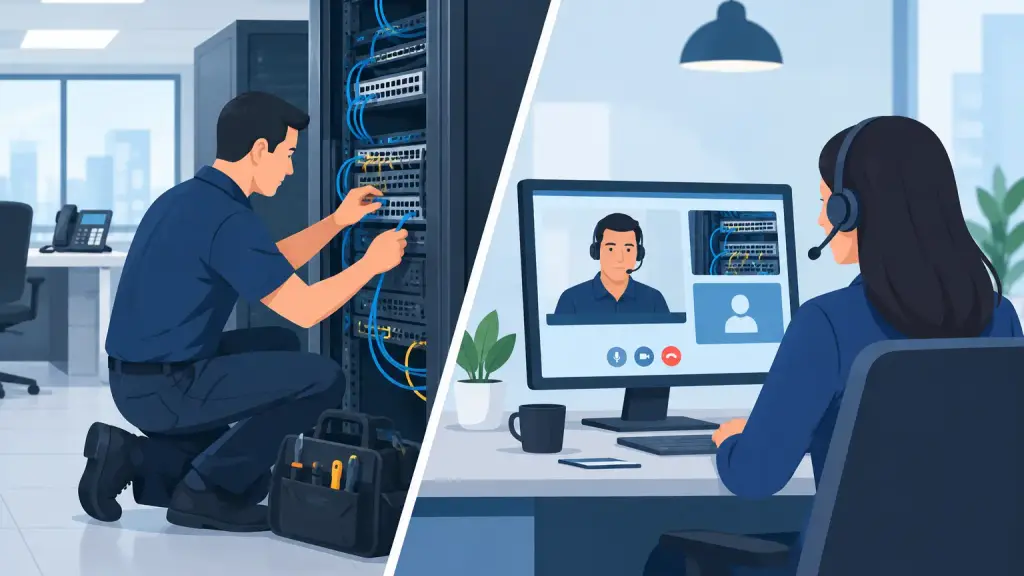
A phone system can appear to fail all at once: callers cannot reach a department, extensions go silent, or a front-desk phone loses dial tone during the busiest part of the day. The choice between onsite telecom support vs remote support determines how quickly your business can identify the real cause and restore service. For many issues, remote troubleshooting is the fastest first step. For others, a qualified technician needs to be in the building with the right tools and replacement parts.
For businesses operating Panasonic, Nortel, Avaya, NEC, Vodavi, and other legacy PBX systems, the right support model is not about choosing one method forever. It is about knowing which response fits the problem, the system, and the operational risk.
What Remote Telecom Support Can Solve
Remote support allows a telecom technician to access the programming side of a phone system, guide your staff through checks, review call-routing behavior, and isolate many common configuration problems without waiting for a site visit. When phones are partially working and the PBX remains accessible, it can be an efficient way to get answers quickly.
Remote assistance is often appropriate when the issue involves call forwarding, auto attendant routing, voicemail settings, hunt groups, extension programming, time-of-day schedules, or user permissions. A technician may also be able to diagnose whether a reported issue is tied to a carrier service, an internet connection, a hosted VoIP setting, or a single user device.
For an office manager, remote support can be especially valuable when the request is straightforward but urgent. A new employee needs an extension activated. A department needs calls redirected because of a temporary closure. A receptionist needs a changed greeting before business opens. These situations do not always require a truck roll.
The Advantages of Remote Response
The strongest advantage is speed. If the problem is accessible remotely, support can begin immediately without travel time. This can reduce disruption for simple programming changes and help teams make informed decisions before escalating the issue.
Remote diagnostics can also prevent unnecessary onsite work. For example, what looks like a failed phone system may be a carrier outage, a disconnected network device, a power issue, or an accidental programming change. Identifying that distinction early keeps the response focused.
Remote support is also useful after an onsite repair or installation. It gives businesses a practical way to handle routine adjustments, user questions, and minor changes while reserving onsite service for work that requires physical access or testing.
Where Remote Support Has Limits
A remote connection cannot repair a damaged cable, replace a failed card, trace a dead station port, test a power supply, or inspect equipment that has lost power. It also cannot physically access a PBX cabinet, wiring closet, demarcation point, or desktop phone that is not communicating with the system.
Legacy phone systems add another consideration. Many older PBX platforms were installed before remote management became standard. Some have limited remote access, outdated connectivity, or programming that can only be safely reviewed at the equipment location. Even when remote access is available, a technician may need to verify the condition of hardware before making changes.
There is also a practical business limit: remote support depends on someone onsite being able to follow instructions. If no one can access the telecom room, locate the correct equipment, check power, or identify which cables and phones are affected, a remote session may only confirm that an onsite visit is needed.
When Onsite Telecom Support Is the Better Choice
Onsite service is the right response when physical infrastructure is part of the problem. This includes complete or widespread loss of dial tone, PBX hardware failures, damaged cabling, failed power supplies, loose connections, station card problems, equipment relocation, and new phone or network cabling work.
A qualified field technician can inspect the entire communication path. That means checking the incoming service, the PBX, power protection, wiring blocks, patch panels, network equipment where applicable, individual phones, and the programming that ties everything together. This end-to-end view is often what resolves difficult intermittent problems that cannot be reproduced remotely.
For a business with a legacy PBX, onsite expertise matters because the equipment may have years of custom programming and site-specific wiring behind it. A technician who understands the system can diagnose the failure without treating the PBX as disposable. In many cases, targeted repair or replacement of a component can restore service and protect the investment you have already made.
Situations That Usually Require a Technician Onsite
An onsite visit is generally necessary when your team is dealing with one or more of the following:
- No dial tone across multiple phones or the entire office
- A PBX cabinet, card, power supply, or processor alarm
- Phones or departments affected by physical moves or office renovations
- Damaged, cut, mislabeled, or unreliable cabling
- A need to install, relocate, or test phones and equipment
- A recurring issue that remote troubleshooting has not resolved
Physical testing matters in these cases. A technician can isolate whether the fault is in the carrier circuit, the building wiring, the phone system hardware, or a specific endpoint. Guessing at the source can prolong downtime and create more disruption for staff and customers.
Onsite Telecom Support vs Remote: The Real Decision Factors
The best choice depends less on preference and more on the scope of the outage. Start with the number of people affected. If one extension has a call-routing or voicemail issue, remote support may be enough. If an entire department loses service, the problem may involve hardware, cabling, or a shared system resource that requires onsite diagnostics.
Next, consider whether the phone system itself is reachable and stable. A functioning PBX with a programming issue can often be addressed remotely. A PBX that is offline, showing alarms, rebooting unexpectedly, or inaccessible cannot be repaired through a remote session alone.
Your office environment matters too. Multi-location organizations may benefit from remote support for standard programming across sites, while still maintaining a local field-service plan for Chicago-area offices when equipment fails. A single partner that can provide both options avoids the handoff between a remote help desk and a separate field contractor during an outage.
Finally, think about the business impact. A minor user change can wait for a scheduled remote session. A phone outage affecting customer calls, appointment scheduling, dispatch, sales, or emergency coordination needs a fast-response plan. In that situation, the goal is not simply to identify the issue. It is to restore reliable communications with the least possible interruption.
A Better Support Strategy for Legacy PBX Systems
The most dependable approach is a layered one. Use remote support for accessible programming, routine moves and changes, and early diagnostics. Use onsite service when the condition of the hardware, wiring, power, or physical phone infrastructure is uncertain.
This model gives businesses flexibility without sacrificing accountability. Rather than being told that an aging system cannot be supported, you can have it evaluated by technicians who understand legacy PBX equipment and can explain the practical options: repair the immediate issue, maintain the existing platform, improve weak points, or plan a measured move to hosted VoIP when it makes operational sense.
A modernization decision should be based on business needs, not pressure caused by a single repair. Some organizations need to preserve their existing PBX because it remains dependable and supports critical workflows. Others need better scalability, easier management across locations, or a path away from aging hardware. Both situations require clear technical guidance.
What to Expect From an Effective Service Partner
A capable telecom provider should not force every issue into remote support or automatically recommend an onsite visit. The first step should be listening to what changed, who is affected, and what the phones are doing. From there, the provider should determine whether remote diagnostics can safely resolve the issue or whether an experienced technician needs to inspect the site.
For emergency situations, response matters as much as technical knowledge. iTeleco provides 24/7 emergency support for businesses that cannot afford to leave communication problems unresolved overnight or through a busy workday. For offices in Chicago and the surrounding suburbs, local onsite capability can make the difference when a hardware or cabling issue is stopping daily operations.
When your phones are part of how you serve customers, schedule work, coordinate staff, and close business, choose support based on the failure in front of you. Start remotely when it is practical. Bring in onsite expertise when the issue demands hands-on diagnostics, repair, and accountability.